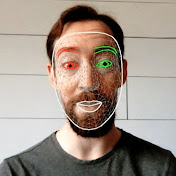
Create your own custom face-tracking video filter using Python, OpenCV, and MediaPipe.
In this tutorial we overlay a mustache on a tracked face. This filter can be used in Zoom, Teams, etc. It also works with video recordings as input.
The resulting code is available at https://github.com/everythingishacked/Stash
00:00 Intro
01:24 MediaPipe Face Mesh
05:21 Using facial landmarks
07:26 Drawing shapes with OpenCV
10:21 Prepare the mustache
11:45 Overlay the mustache
17:30 Scale the mustache
23:57 Other possibilities
24:25 Code cleanup
25:23 Concluding thoughts
26:00 BUT WAIT THERE'S MORE pyvirtualcam for output
28:33 pipreqs to create requirements.txt