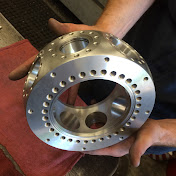
Making a “bolt circle” pattern
Procedure for setting up a job in a dividing head / indexer for a bolt circle
If you don't have a CNC machine to put these holes in, that's OK.
You can do just as accurate hole locations by rotating the dividing head by 60 degrees for each hole location - exactly 60 degrees for 6 holes.
By moving the table out 2.750" from the center of the part, you will have a 5.500" diameter bolt circle - with equally spaced holes.
Of course without a dividing head or rotary table you can still get these holes accurately located by using the a little math to figure out the X and Y coordinates for each hole - giving you the same exact accuracy.... or if you have a way to make a CAD drawing of a 5.500
bolt circle it will give you those X and Y coordinates too.