Сivil 3D: Extending the Surface while maintaining a variable slope.
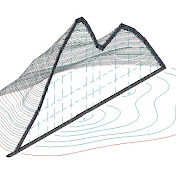
Extending the Surface while maintaining a variable slope. It is really easy to Extending the surface when the slope of the surface is always constant, but if the transverse slope as on superelevations smoothly changes its value, then I can suggest 3 ways to extending the surface while maintaining the slope to a new edge. 1. Extend the extracted Contours to the new surface Border and then build a new surface along the Contours (Adding Contour Data to a Surface) 2. Expansion of the surface by calculations in Excel, when the percentage of slope is calculated from the extracted elevation and offsets and the elevation on the new offset is recalculated by the calculated slope. (a Report is automatically created) 3. To Create a Corridor according to a special Assemblies that supports an arbitrary amount of shift from the extracted edge, curb of the surface. 00:00:00 - 1. Construction of a surface slope label to show that the slope of the surface changes from stations 00:00:24 - 1. Changing the display of the contour interval of the surface for a more accurate extending of the surface 00:00:50 - 1. Draw a new Border( for the border of the new surface 00:01:00 - 1. We extract Contours from the surface in the form of 3D polylines 00:01:24 - 1. We extend the extracted 3D polylines to a new surface edge (line) 00:01:45 - 1. Creating a new surface along extracted Contours 00:02:34 - 1. We check the coincidence of the slope values on the old and new expanded surface 00:02:54 - 2. Construction of the Sample Lines along which the extending of the surface will be performed 00:03:27 - 2. Extracting the Border of the surface into a 3D polyline 00:03:44 - 2. Breaks (EXPLODE of Sample Lines to polylines 00:04:06 - 2. Trim of the obtained polylines with the extracted the border of the surface (3D polyline). Cropping with the MAPCLEAN command 00:04:20 - 2. Erase Dangling Objects. entering the length less than which the polyline will be Erase 00:04:39 - 2. Create COGO points in automatic mode (for convenience, disable Prompt for descriptions and Prompt for elevation) _AeccCreatePointAutomatic 00:05:11 - 2. Creating a Report in which the stations and offset are calculated from the coordinates of the points. Create Reports - Station Offset to Points Report REPORTPOINTSSTAOFFSET 00:05:20 - 2. Excel, Deleting unnecessary data, and sorting points for importing points to CIVIL_3D along the Alignment 00:06:28 - 2. Importing points to the Alignment by station and offset (1) CREATEPOINTIMPORTFROMFILE 00:06:57 - 2. Update point elevations to surface _AECCEDITPOINTSURFACEELEVS 00:06:57 - 2. Creating a Reports already with the correct elevations, in which the station and offset are calculated from the coordinates of the points. Create Reports - Station Offset to Points Report REPORTPOINTSSTAOFFSET 00:07:25 - 2. Excel, forming a Reports by sorting points 00:09:25 - 2. Excel, checking the match of Stations in the lines of the statement ( TRUE & FALSE) 00:10:02 - 2. Excel, calculating the slope of the surface in % to the left of the Alignment 00:10:42 - 2. Excel, calculation of the slope of the point offset by 2 meters from the old edge of the surface 00:11:01 - 2. Excel, preparing points for import to CIVIL 00:11:17 - 2. Import of points 2 meters from the old edge of the surface by Station and offset (3) CREATEPOINTIMPORTFROMFILE 00:12:01 - 2. Checking for the coincidence of the calculated slope in ECXEL with the slope of the surface 00:12:34 - 3. Creating a profile on the surface 00:12:43 - 3. Creating a Assemblies with the GenericPavementStructure element 00:13:02 - 3. Specifies additional width to add. Shift Width by 2 meters and to add the TopLink Codes code (arbitrary) 00:13:46 - 3. Extracting the Border of the surface into a 3D polyline to set target for the corridor 00:14:07 - 3. Create Feature Lines from 3D polyline a name assignment for convenience in creating a corridor 00:14:25 - 3. Creating a Corridor and Specifies the Corridor limit (the interval along the Alignment in which the corridor should be built) 00:14:53 - 3. Setting the frequency (The frequency of the use of Assemblies or at what interval the surface will be calculated) 00:15:00 - 3. Setting targets for the Feature Lines, selecting Feature Lines (limiting the width of the Feature Lines, and reaching the marks of the Feature Lines) 00:15:49 - 3. Creating a surface from a corridor, specify the code from Assemblies in the Feature Lines Subassembly 00:16:15 - 3. Checking for the coincidence of the slopes of the old surface and the new one with an offset of +2m and calculated earlier in Excel Each of these methods is convenient for its task, for example: 1. - the fastest and for rough work; 2. the method automatically creates a Report for builders; 3. the method allows you to quickly change the parameters of the resulting surface. p.s. this video was the most difficult … NO WAR!
Download
0 formatsNo download links available.