IMVU Avatar Editing Tutorial
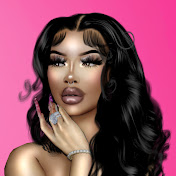
Y'all really messed with this one on Instagram so I thought I'd explain how I did it, I'm gonna include this bag as a freebie for everybody so y'all can try it yourselves, plus who doesn't want a free Goyard bag??? Love You Guys Enjoy The Video !! When Taking Photos for Edits Remember; The Pose doesn’t matter as long as your avatar is bald and their head is facing either forward to the side or completely sideways, however your wig is made, as long as your avatars head matches the position of the wig, you’re all good With Morph Edits, you’re gonna have to cut you avatars head from a photo, so whichever photo you plan on morphing, your avatars head will have to mimic the position of the girl in the photo. When Editing Your Avatar; Keep Enhancements like Soft Light, Overlay, & Addition to make your avatar look more 3d please keep them inside the perimeter of your Avatar that way there's nothing interfering with the background. You Can still keep your background when chopping your avatar out of a photo, just double the photo layer and hide the bottom layer then chop your Avi out of the top layer, now you have a perimeter to either select or clip down to. BAG LINK: https://i.postimg.cc/MT2kdxVj/ACCBAG1.png
Download
0 formatsNo download links available.